
Viewer
a plurid technology
Your files, browser and terminal in one spatial workspace. Ask an agent to build the tool you need, right beside them.
Apple silicon · macOS 14 or later
Workspace
Open a drawing beside its source. Keep a browser beside your files. Run a command in the project folder. Plurid connects these views as planes you can arrange, follow and return to.
Viewer brings file browsing, previews, editing and local commands into that workspace. A conversation can use the project material you choose to share.
Tools
Describe the controls you need, or start with a working plugin. The agent can change its interface and use its actions. You can operate those same controls yourself.
In the demo, Meta extends a robotics plugin with a results table, compares mounting points, then revises its recommendation when the centre of the bench must stay clear.
How generated tools work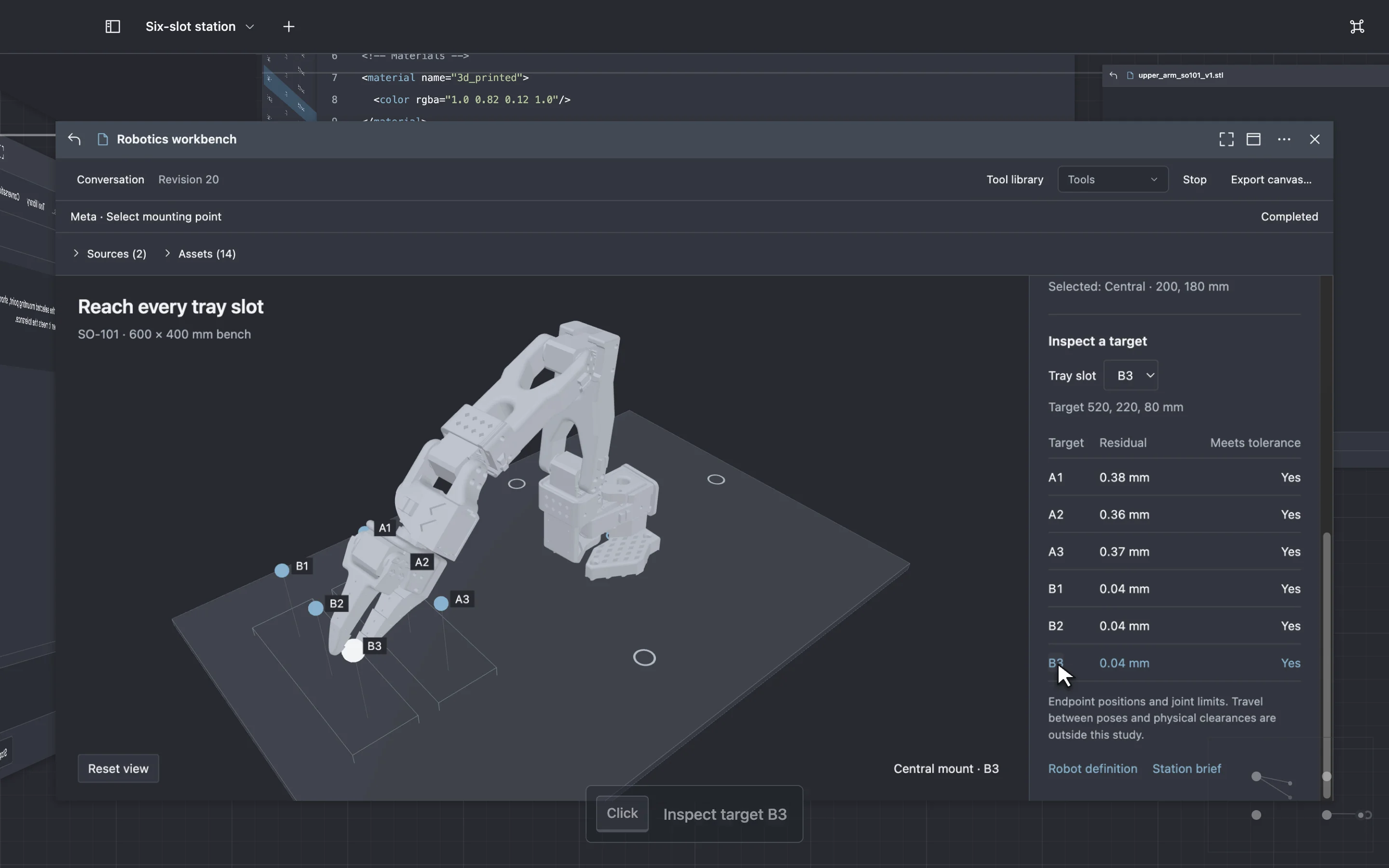
- Quote branches
- Select a passage and ask about it in a separate conversation. Open the alternative beside the first tool.
- Tool library
- Rename, duplicate, enable and disable tools in the Tool library. Saved inputs stay with the tool as it changes.
- Portable tools
- Review a result before saving it. Export the tool with its code, assets and inputs, then reopen it without a model connection.
Download
Files and saved tools work locally. To ask for a new tool or a change, configure a model and choose the data it may receive.
Apple silicon · macOS 14 or later